



Google Maps is a digital mapping and navigation service that helps people find places, plan routes, check travel times, explore businesses, and navigate from one location to another. It works on phones, tablets, computers, and some vehicles. Beyond basic directions, Google Maps provides information about businesses, traffic, public transportation, cycling routes, Street View, satellite imagery, saved places, location sharing, and offline maps, although feature availability can vary by country and device.
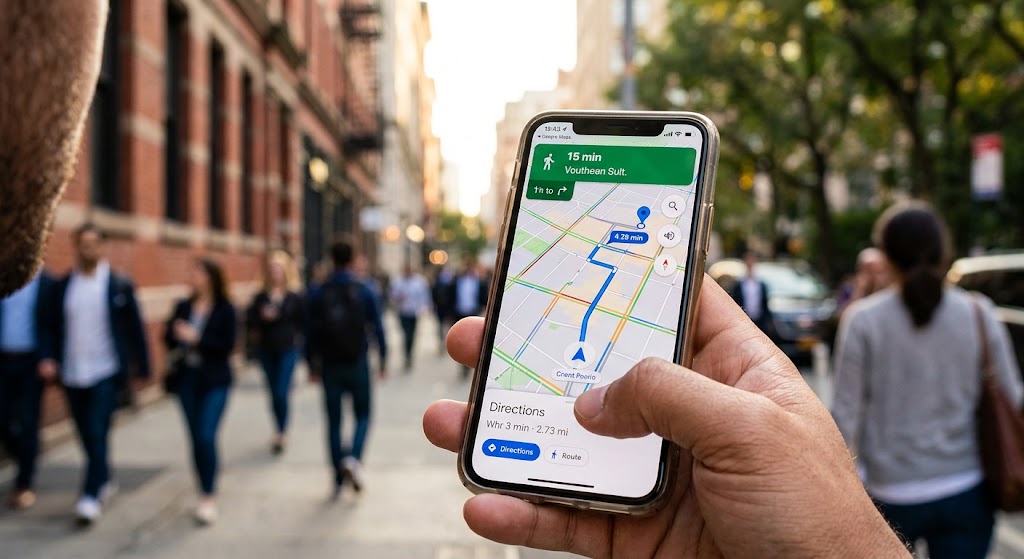
What Is Google Maps?
Google Maps is an online mapping service that combines digital maps with location search, directions, navigation, and information about places.
You can use Google Maps to search for an address, business, landmark, neighborhood, or general category such as restaurants or gas stations. After selecting a location, Maps can provide details such as an address, operating hours, reviews, photos, menus where available, and directions.
Google Maps is available through a web browser and dedicated mobile applications. The exact features you see can depend on your device, location, language, and region.
How Does Google Maps Work?
Google Maps combines mapping information, location technology, navigation data, and information about places to provide maps and route guidance.
When you use turn-by-turn navigation, Google Maps can use information such as GPS location, the route being traveled, and sensor information from the device. Google says navigation data helps Maps provide features such as traffic conditions, disruptions, estimated travel times, and alternate routes.
The blue location indicator on the map generally represents your current position when location services are available. Because GPS and digital mapping are not perfect, users should still pay attention to road signs, traffic rules, and actual road conditions.
What Can You Do With Google Maps?
Google Maps provides much more than basic driving directions, with tools for transportation, local search, trip planning, and exploration.
Search for Places and Businesses
You can search for a specific place by name or search for a type of place nearby. For example, you might search for a restaurant, hotel, pharmacy, bank, shopping center, park, or tourist attraction.
A place profile may include information such as its address, business hours, reviews, photos, and other details. Some locations may also provide menus, reservation options, or additional business information.
Get Driving Directions
Google Maps can calculate routes between locations and provide estimated travel times.
To get directions, search for your destination, select it, choose Directions, and then select the appropriate transportation method. Available options can include driving, public transportation, walking, cycling, rideshare services, and motorcycles, depending on the location.
If several routes are available, Maps can display alternative routes and their estimated travel times. You can select another route if it better suits your needs.
Check Traffic Conditions
The traffic layer can help you understand current road conditions before or during a trip.
Traffic information can show areas where vehicles are moving slowly or where congestion is present. Google also uses navigation data to support real-time features involving traffic and route changes.
Traffic information is not a guarantee that a particular route will remain clear. Conditions can change because of accidents, construction, weather, road closures, or unexpected congestion.
What Are Google Maps Layers?
Google Maps layers let you change the type of geographic information displayed on the map.
Common layers include standard maps, satellite imagery, traffic, public transportation, cycling information, terrain, and Street View. Google also provides additional map information in supported locations, including air-quality and travel-time features.
Satellite View
Satellite view displays aerial imagery instead of the standard road-map appearance.
This can be useful when you want to understand the physical layout of an area, identify buildings, examine large properties, or get a broader view of a landscape.
Terrain View
Terrain information helps show the shape and elevation of the land.
This can be particularly useful in mountainous or hilly areas because elevation information can provide additional context that is not obvious from a standard road map.
Public Transportation
Where supported, Google Maps can display public transportation information such as bus, train, subway, or other transit routes.
Availability and coverage vary between locations, so travelers should check the information shown for their specific journey.
What Is Street View in Google Maps?
Street View lets users explore available locations through panoramic imagery at street level.
Instead of looking only at a traditional map, you can use Street View to examine streets and surrounding areas visually. This can help someone recognize an entrance, understand the appearance of a neighborhood, or preview a destination before visiting.
Street View coverage is not identical everywhere. A blue line on the map indicates areas where Street View imagery is available.
Can Google Maps Work Without Internet?
Yes, Google Maps can provide offline navigation after you download an eligible map area to your device.
Before traveling through an area with unreliable internet access, you can download the relevant map while connected to the internet. If the entire driving route is covered by the downloaded map, Google Maps can provide navigation when you are offline.
Offline Maps has limitations. When you are offline, features such as live traffic information and alternate routes are unavailable, and offline transit, cycling, or walking directions are not available according to Google’s current help documentation.
How to Download an Offline Map
- Open Google Maps while connected to the internet.
- Search for the area you plan to visit.
- Open the location’s information panel.
- Select the option to download an offline map.
- Adjust the selected area if necessary.
- Download the map to your device.
Google also allows users to select their own map area for offline use.
How Do You Plan a Trip With Google Maps?
Google Maps can help you plan a trip before leaving by showing routes, estimated travel times, transportation options, and information about places along the way.
You can search for a destination and compare available transportation methods. For driving trips, you can also add stops and change the order of destinations. Google Maps currently supports adding multiple stops, with Google’s Android documentation stating that up to nine stops can be included, counting the final destination.
For longer journeys, downloading the relevant offline map before departure can provide an additional navigation option if mobile internet becomes unavailable.
Can You Save Places in Google Maps?
Yes, Google Maps allows users to save places and organize them into lists.
Saved places can be useful for planning vacations, keeping track of restaurants you want to visit, remembering businesses, or organizing locations for a future trip. Google describes saved-place lists as a way to organize and quickly access frequently used locations.
You can create different lists based on your needs rather than keeping every location in one collection.
Can You Share Your Location With Google Maps?
Google Maps includes a location-sharing feature that allows users to share their real-time location with selected people.
The feature can be useful when meeting someone, coordinating travel, or letting another person know where you are. Google provides controls for choosing who can find your location and whose location you can see.
Because location information can be sensitive, users should review who has access to their location and adjust sharing settings when circumstances change.
Does Google Maps Collect Location Data?
Google Maps can collect navigation-related information when certain navigation features are being used.
Google states that navigation data can include GPS location, navigation details such as the route traveled, and sensor data from devices. This information can be used to improve navigation and provide features such as traffic information, route suggestions, and disruption updates.
Google also provides privacy-related controls within Maps, including settings for location sharing, Timeline, Incognito mode, and other account-related options.
Users should review their Google Account and Google Maps privacy settings if they want to understand how location information is managed.
How Accurate Is Google Maps?
Google Maps can be highly useful for navigation, but its information should not be treated as infallible.
Roads can change, businesses can move or close, traffic can develop unexpectedly, and map information can occasionally contain errors. Google provides options for users to report incorrect directions and contribute corrections to places and roads.
For driving, walking, and cycling, always compare digital directions with physical signs and actual conditions. Google itself advises users to remain aware of their surroundings and follow applicable traffic regulations.
What Are Some Common Google Maps Mistakes?
Most Google Maps problems come from outdated information, incorrect destination details, connectivity limitations, or relying on the suggested route without checking the real-world conditions.
A business may have changed its hours, a road may be closed temporarily, or a newly changed street layout may not yet be reflected perfectly. A route can also become less suitable because of construction, traffic, weather, or local restrictions.
The safest approach is to use Google Maps as a navigation aid rather than as a replacement for road signs, official transportation information, or common sense.
How Can You Use Google Maps More Effectively?
A few simple habits can make Google Maps more useful for everyday travel.
- Check the destination carefully. Make sure you have selected the correct business, address, or location before starting navigation.
- Compare routes. Look at estimated travel times and available alternatives instead of automatically choosing the first route.
- Check traffic before leaving. Current traffic conditions can affect the practical travel time.
- Download offline maps before remote travel. This provides a backup when mobile data is unreliable.
- Use Street View when unfamiliar with an area. Looking at the destination beforehand can help you recognize roads and entrances.
- Review privacy settings. Check location sharing and other location-related controls regularly.
- Follow real-world signs. If a road sign conflicts with an app instruction, follow the applicable road rules and signage.
Frequently Asked Questions About Google Maps
Is Google Maps free?
Google provides Google Maps as a consumer mapping service, and the standard Maps app is available for mobile devices. Some third-party services or features encountered through Maps may involve separate costs.
Can Google Maps show traffic?
Yes. Google Maps provides a traffic layer and uses navigation data to support real-time traffic and route information where available.
Can Google Maps work offline?
Yes. You can download supported map areas before traveling and use them for offline driving navigation when the entire route is covered. Live traffic and alternate routes are not available offline.
Can Google Maps show satellite images?
Yes. Google Maps provides a satellite map type that displays aerial imagery.
Can Google Maps provide walking directions?
Yes. Walking directions are supported in Google Maps, although coverage and specific functionality can vary by location.
Can Google Maps show public transportation?
Yes. Where supported, Google Maps can display public transportation routes and related information.
Conclusion: Why Google Maps Is Useful
Google Maps is a versatile mapping and navigation service that combines directions, local search, traffic information, Street View, satellite imagery, public transportation, saved places, location sharing, and offline maps. Its usefulness comes from bringing these different tools together in one service, while availability can vary by country, device, and feature.
For everyday navigation, the best approach is to use Google Maps alongside real-world road signs and current conditions. Readers interested in related topics can explore Google Maps offline navigation, Google Street View, Google Maps traffic information, and how to share your location on Google Maps.